• SLIDER-1-TITLE-HERE

    Replace these every slider sentences with your featured post descriptions.Go to Blogger edit html and find these sentences.Now replace these with your own descriptions.[...]

  • SLIDER-2-TITLE-HERE

    Replace these every slider sentences with your featured post descriptions.Go to Blogger edit html and find these sentences.Now replace these with your own descriptions.[...]

  • SLIDER-3-TITLE-HERE

    Replace these every slider sentences with your featured post descriptions.Go to Blogger edit html and find these sentences.Now replace these with your own descriptions.[...]

  • SLIDER-4-TITLE-HERE

    Replace these every slider sentences with your featured post descriptions.Go to Blogger edit html and find these sentences.Now replace these with your own descriptions.[...]

Tampilkan postingan dengan label Cara Update Samsung Galaxy S4. Tampilkan semua postingan

Sabtu, 28 Desember 2013

Posted by Dimas Hartono on 18.44

Cara Update Samsung Galaxy S4 


Sering mengalami restart pada saat membuka Kamera pada samsung Galaxy S4?
Sekarang sudah tidak perlu khawatir terjadi restart lagi, karena samsung sudah memperbaiki celah tersebut dengan update software (Operating System) pada Samsung Galaxy S4.
Ikuti langkah berikut untuk update :
- Hubungkan Device anda dengan Wifi (pastikan koneksi internet stabil)
- Matikan aplikasi yg ada di task manager, dengan cara tahan tombol home (tengah bawah) 2 detik, dan pilih CLEAR ALL
- Masuk ke Setting, Lalu ketuk MORE pada atas kanan Device anda, lalu pilih ABOUT DEVICE
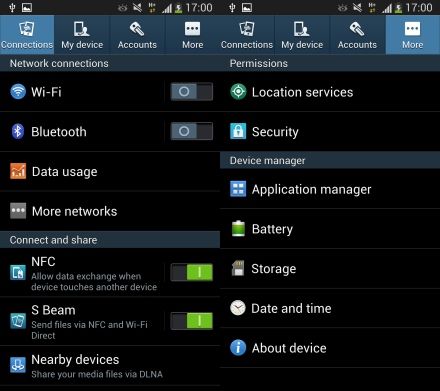
- Setelah masuk ke menu baru, pilih SOFTWARE UPDATE. Maka Device akan mencari Operating sistem baru yg tersedia.
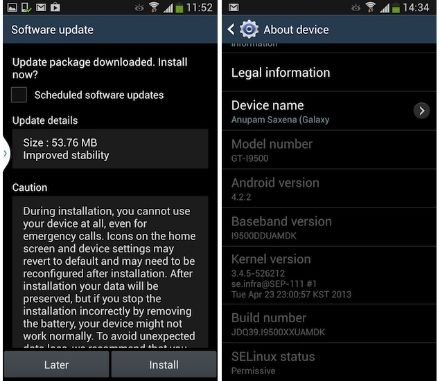
- Tunggu sekitar 1 jam maka device akan me-restart dengan sendiri. Dan, cobalah untuk membuka kamera. :)
- Selamat ber-narsis ria :)

  • RSS
  • Delicious
  • Digg
  • Facebook
  • Twitter
  • Linkedin

Search Site